Code Blitz

As I had mentioned earlier, since finishing up at school and getting settled here in California, I’ve been keeping busy with several undertakings of my own design. One such activity was getting further work done on my miscellaneous projects. Nothing too significant, mostly just house-keeping and some polishing-up, but that doesn’t mean it can’t still be exciting!

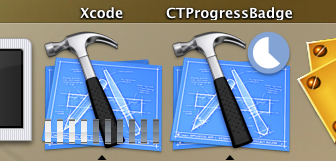
CTBadge: Some minor tweaks, now the badges generated are very nearly identical. First change was to the character alignment, it turns out in fact that Apple aligns their text without the help of NSParagraphStyle. The second change(s) were to the badge gradient, now the colors are darker, and the gradient’s progressions and angles match their corresponding “official” badge (yes, there are different angles for different badges).

CTGradient: Knocked a few items off of my list. The big addition is added support for beautiful chromatic blends! (I’m excited, aren’t you?). In order to celebrate I also hacked out a delightful new icon which I should be adding (sooner or later) to my icon collection.

Aside from that I threw in some new gradient styles (Sourcelist enabled/disabled, Rainbow, and best of all, Hydrogen). What’s more, I added other things like a few colorstop methods (and a bug fix)… but you weren’t interested in those, now, were you?

WWDC

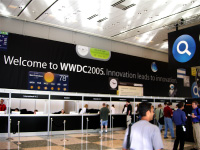
WWDC 2005 Back in April I submitted my application for Apple’s student scholarship to WWDC. Later last month I got word that I’d been selected. Over the weekend I made hotel reservations for me and a friend.

I remember having a smashing time at last year’s conference. There were a number of sessions which piqued my interest, a few which I had to miss (and hope to make up for this time around). Throughout the whole week there was rarely a lack of discusion, what with the whole Intel transition thing going down, but most importantly, that week at WWDC let me sit back and focus on mac development (which had been the first time in a while), it let me jumpstart the personal projects that I had left waiting in the wings, and allowed me gain the momentum I needed to continue those projects months after. My only regret is that this year I’ll be attending at the closing of the summer as opposed to the opening of the same.

…So this August expect me to be in San Francisco. If you expect to be thereabouts as well go ahead and drop me a line.

A Note on Licencing

Copyright symbol

So recently I’ve had a few questions coming in about the whole licensing/code usage thing… And so I figure probably is about time that I make some sorta post clarifying that stuff.

Anyway, getting straight to the point, all the content here (unless otherwise noted) is open, and under the Creative Commons Attribution License. That is to say, anybody can use my work for any reason – I only ask that they give credit where credit is due.

However, I am more than sympathetic with developers who are not too keen on marring that nice, simple, straightforward about box with attributions and the like (I am one of them). So I am more than willing to waive that whole attribution thing (No, that doesn’t mean money – just asking nicely is good enough for me).

The big thing is that I want developers to be able to focus their efforts on what makes their app unique – not expending all their time making it conform. To the extent I can make that possible, I feel that I’ve helped.

LaserLine 2.0?

As noted on my projects page, last year I worked on an inspired little app, LaserLine.

Last week Joey Hagedorn (LaserLine’s progenitor) shared some of his recent brainstorms for the next iteration of LaserLine (he’s already started building new and improved hardware), and I must say I’m rearin’ to go.

Seeing as spring break is starting soon, and I’ll have a whole week’s worth of free time (well almost) I think I’ll try and devote a sizable chunk of it to refreshing that old code.

Code attack!

Over the weekend I managed to get some more coding in (though as usual, not as much as I’d have liked). So here’s a post about that:

Miscellaneous Projects: I decided I’d better make a home for all of my little projects. So now they all have a spot on my miscellaneous projects page. And of course since no page would be complete with out the obligatory picture, I made a question-mark-in-a-package icon to keep them company, cool eh?

CTBadge: I knew when I started it that I’d eventually have to ditch the ripping of Mail.app’s badge images for my own purposes. And after some suggestion I decided to make eventually now. It turned out making ‘counterfeits’ was actually not that bad… started up Illustrator, and a little while later (after finding the Zig-Zag Filter) I had vector (I love vector!) replicas of Mail’s raster badges.

I can't tell the difference

I can’t tell the difference

So now, thanks to the vector masks, CTBadge will get you renders of badges at any size, and also allows you to set the label and badge colors to what ever you’d like (while retaining the classy shading at the lower right corner – beautiful!).

And while all that is swell (and it is) I still wonder if letting people choose any color that they’d like for their badges is a good thing, I’ll rue the day when I see electric purple badges on my dock… but alternatively colored badges have their place I suppose – so there you go. (Though I sure hope people have a darn good reason for not using the classic white on red when they do – and “it looks better” doesn’t quite do it, but I suppose that’s just me).

CTGradient: Now it has a method to do a radial fill. After putting off including the code for a while, I finally settled on the implementation I preferred, which was leaving axial/radial specifics in the drawing methods where they belong – and not as a part of the instance. Though a few questions still remain – as I have it now, it draws so the gradient progresses from the center to the outermost edge, would there ever be a reason to have it progress to either the nearest edge or even off to the corner? meh, it’s good enough for now.

I also finished implementing all the boring parts of CTGradient, that is, I finally implemented the NSCopying and NSCoding protocols, and also added some extra accessor methods, documentation, and #pragma’s to the source.

CTTabView: This a new project I’ve started work on, a view designed for doing more of a “Tabbed Views” sort of thing (like Safari/Adium/Firefox) than the “View with Tabs” thing that NSTabView does (and does well). Other people have made things like it… but none have really caught my fancy.

Well, that’s enough for now – I’ll save the rest for a later post.

Gradients in Cocoa

CGShadings are a pain, or well, lets just leave it at all of Core Graphics (CG). While CG is a heck of a powerful library… It always seems to take an elaborate amount of code (as well as time, if your not yet acquainted with it) to do some of the simplest little things. For a discussion on creating gradients with CGShading go here.

cocoa gradient

Now, AppKit provides a pretty decent layer of abstraction, but I find that there are still a number of holes in its coverage of those lower level APIs that could use some filling.

One of those that AppKit doesn’t cover (that it really, really should, especially given the whole resolution independence thing that’s in the works – 10.5 maybe? please?), are gradients.

When I started coding up a sourcelist (you know, the tableView with the iTunes/iPhoto/Mail styling) and also thinking of a few of the mini-projects that I had plans for, many of which could use gradients also – I figured that I might as well take a little detour and try my hand at filling in that gap.

And so, let me introduce you to my little Cocoa Obj-C Gradient class, CTGradient. It’s a small class that should provide a decent cocoa interface for CGShading.

In my case, CTGradient has gone a long way toward making the code in several of the projects I’ve been working on significantly less cluttered (and that’s always a welcome change). I no longer have lines of GCContext junk in my drawing functions nor do I have CG function callbacks proliferating my code. The few convenience methods that I tacked on help a bit with readability as well.

Download CTGradient
< 100 KB

And so, that said, I figure a few people might find it handy.

As it stands right now, it’s not quite finished (I expect the interface to change by a fair amount in the not to distant future – I have a few additions to make). But in any case the code is stable, so if it does what you need it to do, go ahead and make use of it!

With that I’ll end with a short list of those additions I have plans to make:

  • Radial Gradient (just need to figure out best method interface)
  • Chromatic blending (blending HSB)
  • CTGradientWell (counterpart to NSColorWell – with palette to boot)
  • CTGradientSlider/Selecter? (view to let you add/remove/adjust color stops)
  • Miscellaneous methods for color stops
  • More pre-made gradients styles

Update: Updates and other info will be maintained at svn.oofn.net.
Update: With OS 10.5’s AppKit, I would recommend using only NSGradient.

« Newer EntriesNext Page »
« Previous PageOlder Entries »